Pink Flower
Pink Flower

173 hours saved

173 hours saved

of operational capacity per year

The team has reported time savings of 30-60 seconds per customer call, and gives them investigative consistency even in emergency situations like flash floods and drought.

100% adoption

100% adoption

among primary users
among primary users

Primary user groups have completely adopted the tool, and secondary groups across the organisation have a 72% return rate.

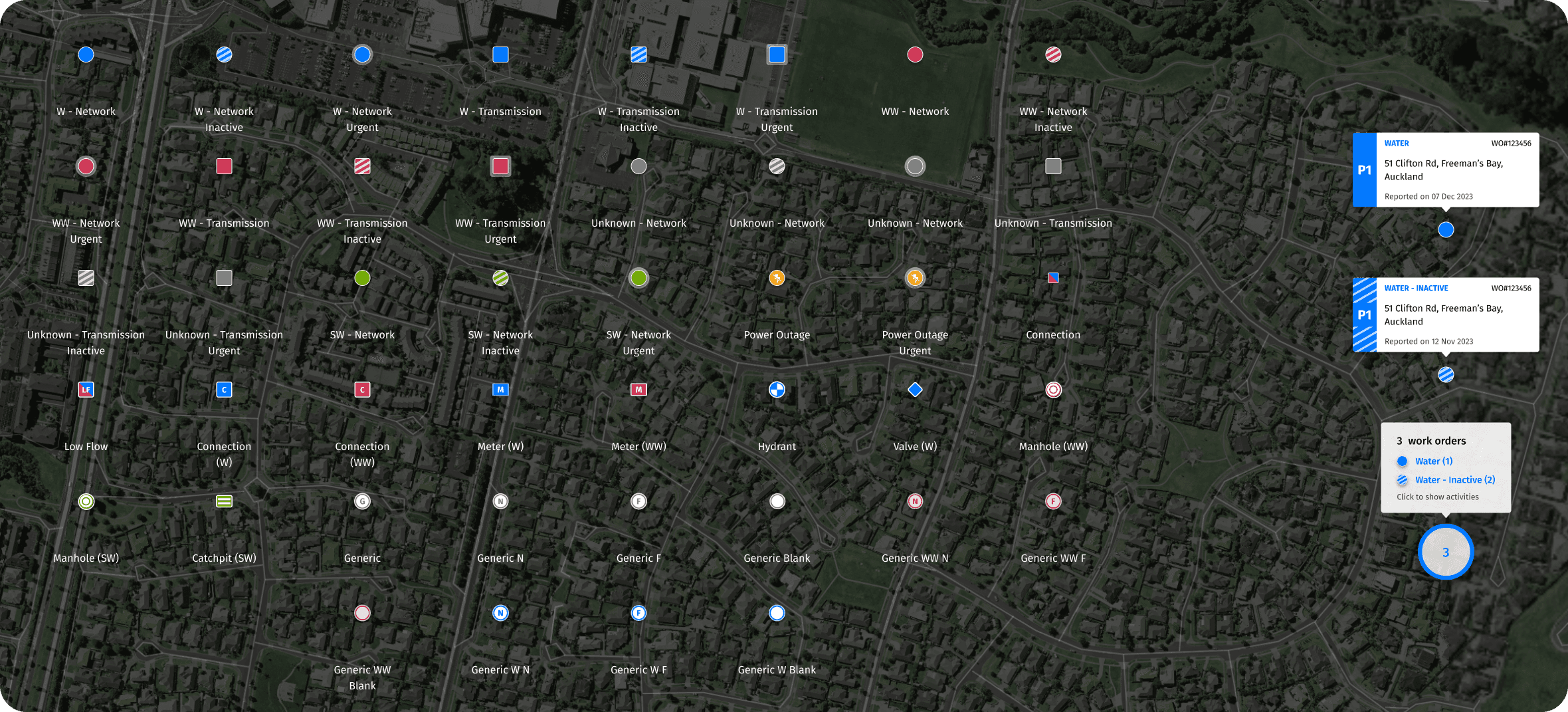
50+ inclusive icons

50+ inclusive icons

custom designed and delivered

A design system with tokens and flexible design choices prepared Activity Tracker for continued expansion, enabling national scale.

6 legacy tools

6 legacy tools

consolidated
consolidated

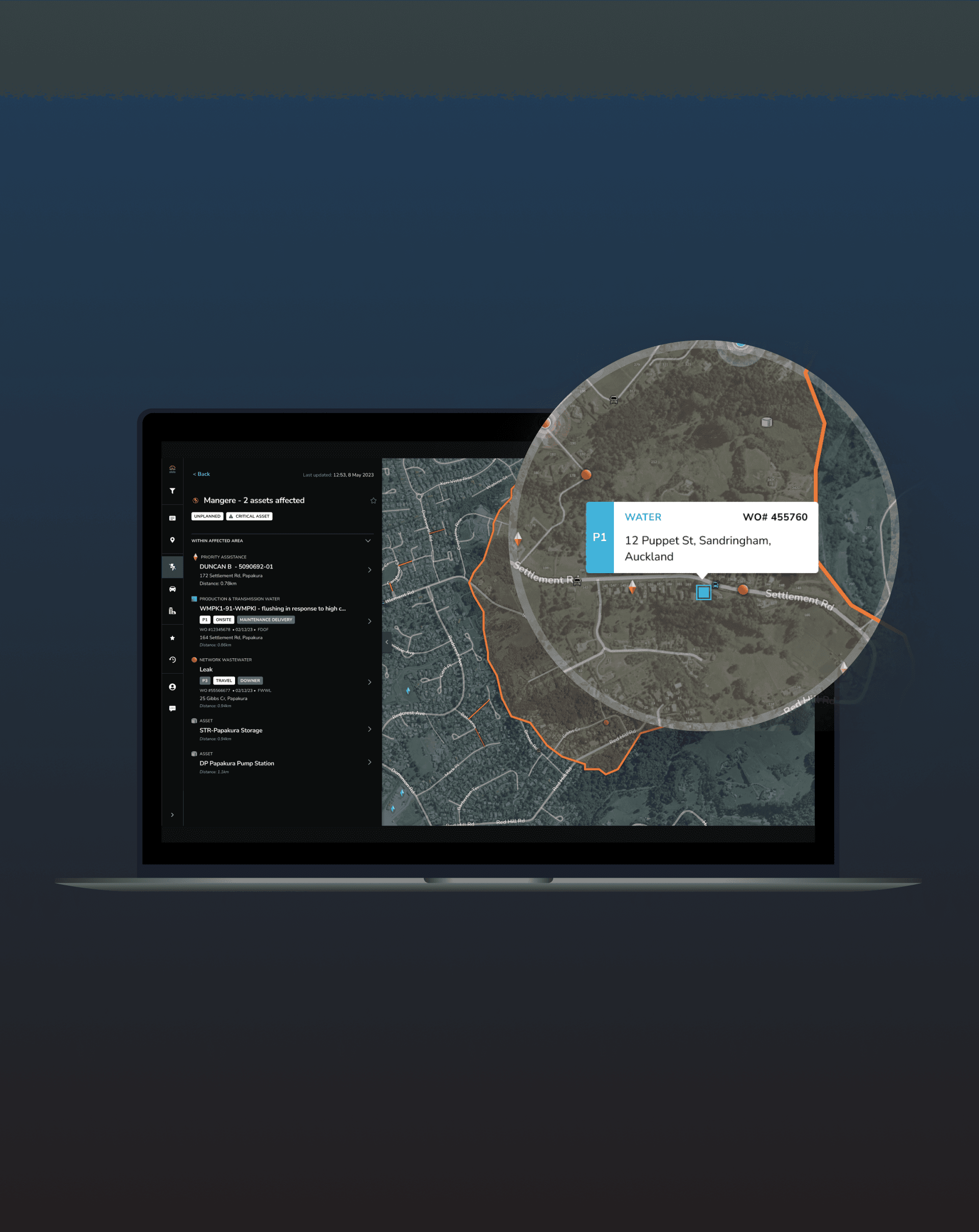
Clunky and difficult to use, with important information lacking context in a spreadsheet. Activity Tracker combined 6 datasets into 1 intuitive geospatial interface with near-live updates.

In a nutshell

When I joined Activity Tracker, the project was in its early stages but had a promising value proposition: a geospatial monitoring tool that consolidated data and functionality from existing tools that people already used across the organisation. The challenge was largely understanding how people actually worked. Many users were deeply attached to their existing processes, even when they were complicated and manual.

I led research and hands-on design to ensure Activity Tracker was ready for launch and built on a foundation that could scale nationally and adapt to new organisational contexts.

Client

Client

Watercare

Role

Role

Year

Year

2022 - 2023

The challenge

Not just another tool in the toolbox.

Watercare staff were overburdened by the number of systems and datasets they had to manage. Activity Tracker couldn’t simply fit into existing workflows; it had to be more efficient and genuinely useful.

Watercare staff were overburdened by the number of systems and datasets they had to manage. Activity Tracker couldn’t simply fit into existing workflows; it had to be more efficient and genuinely useful.

Watercare staff were overburdened by the number of systems and datasets they had to manage. Activity Tracker couldn’t simply fit into existing workflows; it had to be more efficient and genuinely useful.

Separating the signal from noise.

The system monitors thousands of assets across Auckland’s 5,000 km² network. We needed to contextualise physical infrastructure (dams, pipes, reservoirs) within their environment to the people who rely on them, making complex data actionable.

The system monitors thousands of assets across Auckland’s 5,000 km² network. We needed to contextualise physical infrastructure (dams, pipes, reservoirs) within their environment to the people who rely on them, making complex data actionable.

The system monitors thousands of assets across Auckland’s 5,000 km² network. We needed to contextualise physical infrastructure (dams, pipes, reservoirs) within their environment to the people who rely on them, making complex data actionable.

Different users, different needs.

We had to support three distinct user groups with different information needs: Maintenance, Customer Care, and Controllers (staff who monitor multiple screens and manage real-time operational activity across the network), while also being able scale to national and organisational contexts.

We had to support three distinct user groups with different information needs: Maintenance, Customer Care, and Controllers (staff who monitor multiple screens and manage real-time operational activity across the network), while also being able scale to national and organisational contexts.

We had to support three distinct user groups with different information needs: Maintenance, Customer Care, and Controllers (staff who monitor multiple screens and manage real-time operational activity across the network), while also being able scale to national and organisational contexts.

The approach

The first six months focused on deeply understanding Watercare staff workflows and laying the groundwork for Activity Tracker. I uncovered real needs, shaped core layout and interaction decisions, and ensured the system was practical, intuitive, and aligned with day-to-day operations.

The research

1:1 discovery and usability testing

We ran an initial two rounds of 1:1 interviews with Watercare staff, exploring workflows, information needs, and pain points in the first round and validating design iterations in the second.

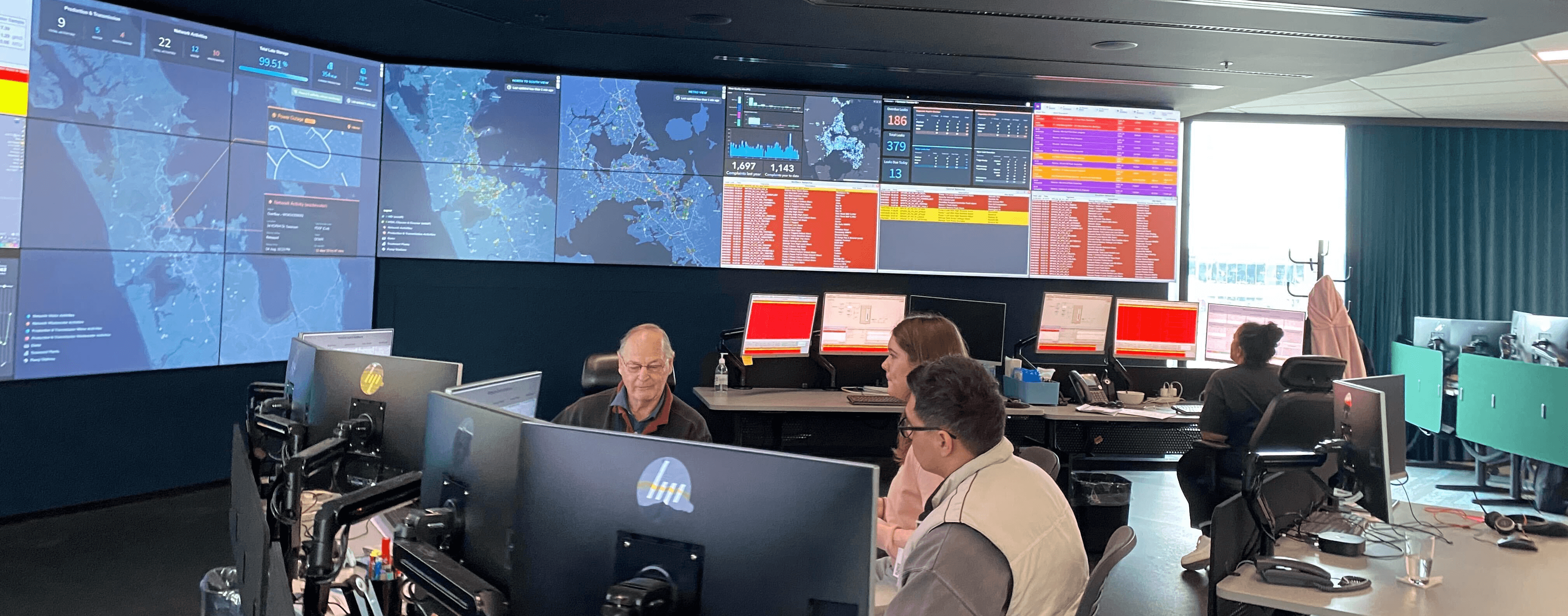
💡 Unlocking hidden workflows with contextual inquiry — Controllers were hard-to-access, always-on users with invisible workflows and long, irregular shifts. I championed deeper insight with this audience through contextual inquiry, uncovering real practices, from key priorities to restrictive desk setups, that directly shaped design decisions.

My colleagues sitting with a Controller in their control room, 2022. (Image source: ghostdynamics.co)

Beta testing

As we moved closer to launch, I ran an internal beta testing round with surveys and targeted 1:1 sessions, validating functionality, refining map and sidebar interactions, and prioritising future features. Insights from all research directly shaped design decisions, interaction patterns, and the foundation for future scalability beyond Watercare.
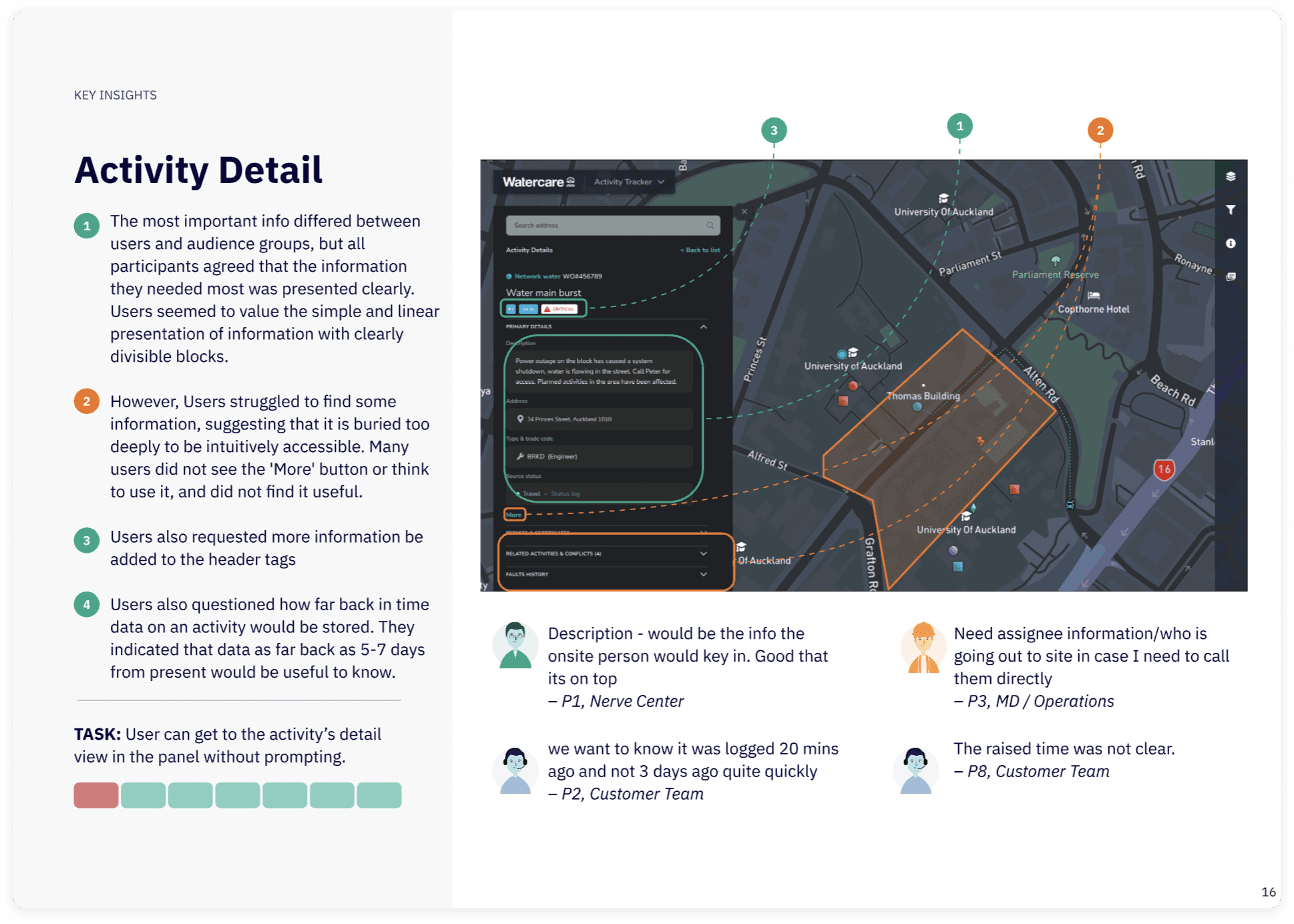
Uncovered insights from our 1:1 testing.

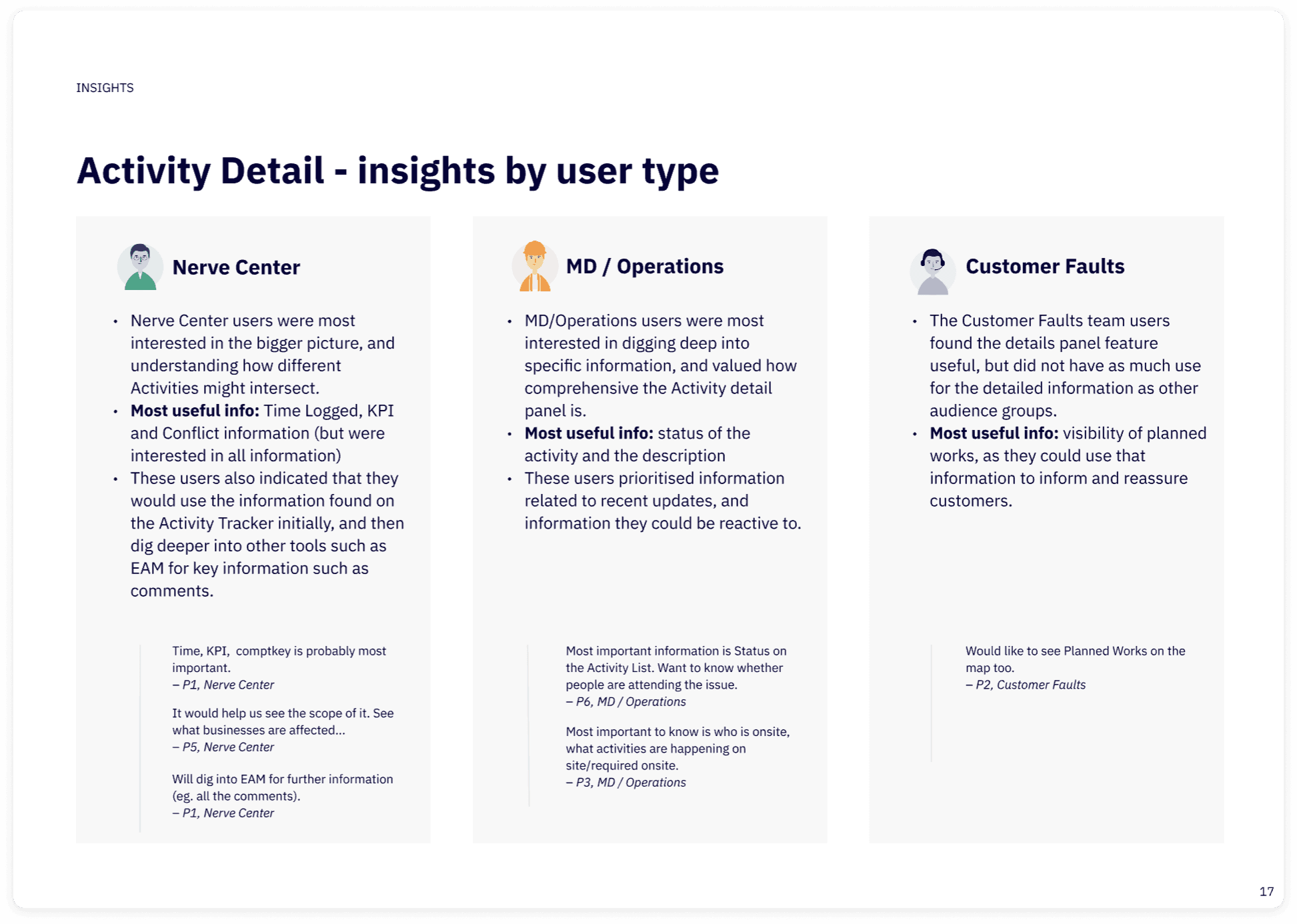
Insights broken down by audience.

Uncovered insights from our 1:1 testing.

Insights broken down by audience.

The insights

  • Speed determines success: Activity Tracker had to outperform long-standing tools that benefited from familiarity and tenure. Map interactions, clustering, and panels needed to enable faster comprehension and action, allowing users to achieve the same outcomes in significantly less time.


  • Visual hierarchy builds confidence: When legends and overlays were hard to find, users had to stop and interpret the interface instead of acting. A stronger visual hierarchy reduced cognitive load and supported faster, more confident decision-making.


  • Validation defines value: Beta testing and follow-ups clarified which features genuinely supported decision-making versus those that added noise, shaping a more focused and defensible roadmap.


  • Adoption follows relationships: Ongoing collaboration with Controllers and Operations built credibility and ownership across the organisation, turning key users into advocates for the tool internally.

The changes

The changes

Clear separation of functions

Clear separation of functions

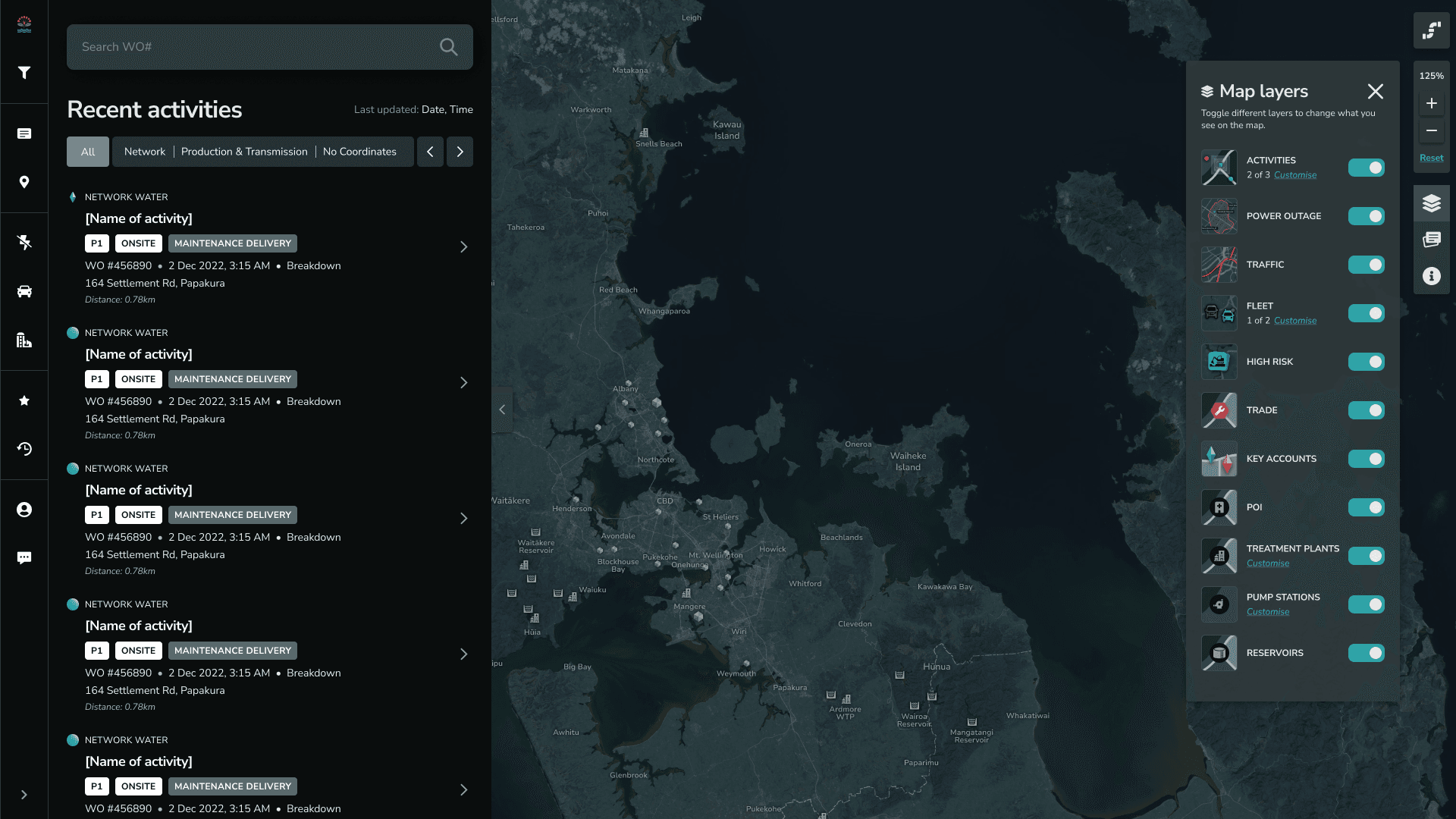
Structured the interface so activity data lived in a dedicated right sidebar while map controls stayed on the left, with search repositioned to support faster orientation and task flow.

Structured the interface so activity data lived in a dedicated right sidebar while map controls stayed on the left, with search repositioned to support faster orientation and task flow.

Structured the interface so activity data lived in a dedicated right sidebar while map controls stayed on the left, with search repositioned to support faster orientation and task flow.

At-a-glance prioritisation

At-a-glance prioritisation

Updated clusters and tooltips so critical information could be understood without drilling or pausing to interpret the map.

Updated clusters and tooltips so critical information could be understood without drilling or pausing to interpret the map.

Updated clusters and tooltips so critical information could be understood without drilling or pausing to interpret the map.

Workflow-aligned interactions

Workflow-aligned interactions

Refined zoom, hover, and panel behaviours to reflect real operational workflows and multi-monitor device setups.

Refined zoom, hover, and panel behaviours to reflect real operational workflows and multi-monitor device setups.

Refined zoom, hover, and panel behaviours to reflect real operational workflows and multi-monitor device setups.

The outcome

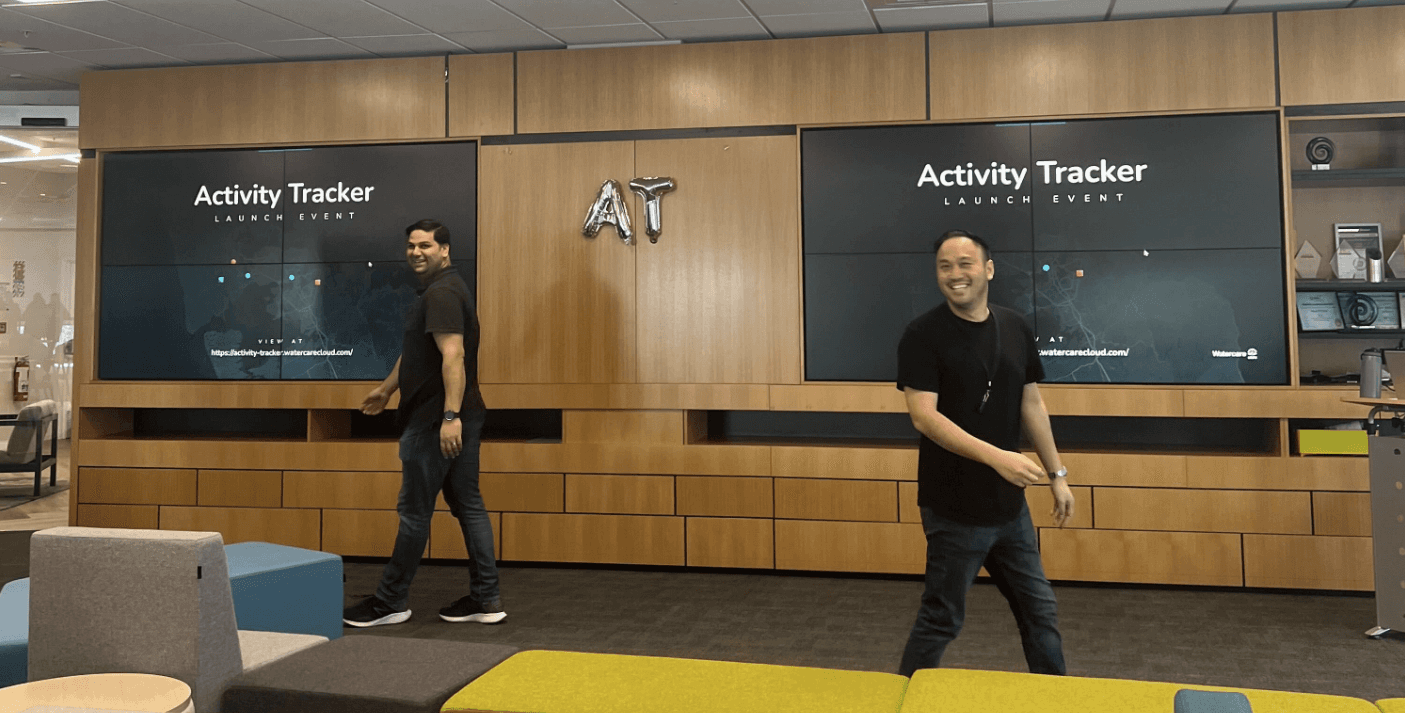
My Chapter Lead and Product Owner at the launch event.

Bringing it all together

The beta launch combined six months of research and design work. We presented a demo to the organisation, ran targeted communications, and collected feedback via surveys, ensuring the tool was tested, understood, and ready for adoption.

Co-designing the full journey

I synthesised research, iterations, and validation into a Journey Map capturing all core user workflows and interactions. Every step and feature, current or pipeline, reflected real user insights.

The map became a key artefact for the Product Owner to communicate Activity Tracker’s value to executives and the organisation, making a complex system understandable at a glance and highlighting the evidence-based decisions behind the design.

Launched and 100% adopted

Activity Tracker launched in June 2023. Of the primary user groups, we have 100% adoption rate. 🎉

Phase 2: Scaling and future features

The second phase focused on preparing Activity Tracker for broader organisational contexts. I worked closely with the Watercare team, which later joined the nationwide water reform, supporting new functionality, scalable workflows across multiple regions and asset types, and laying the foundation for future enhancements.
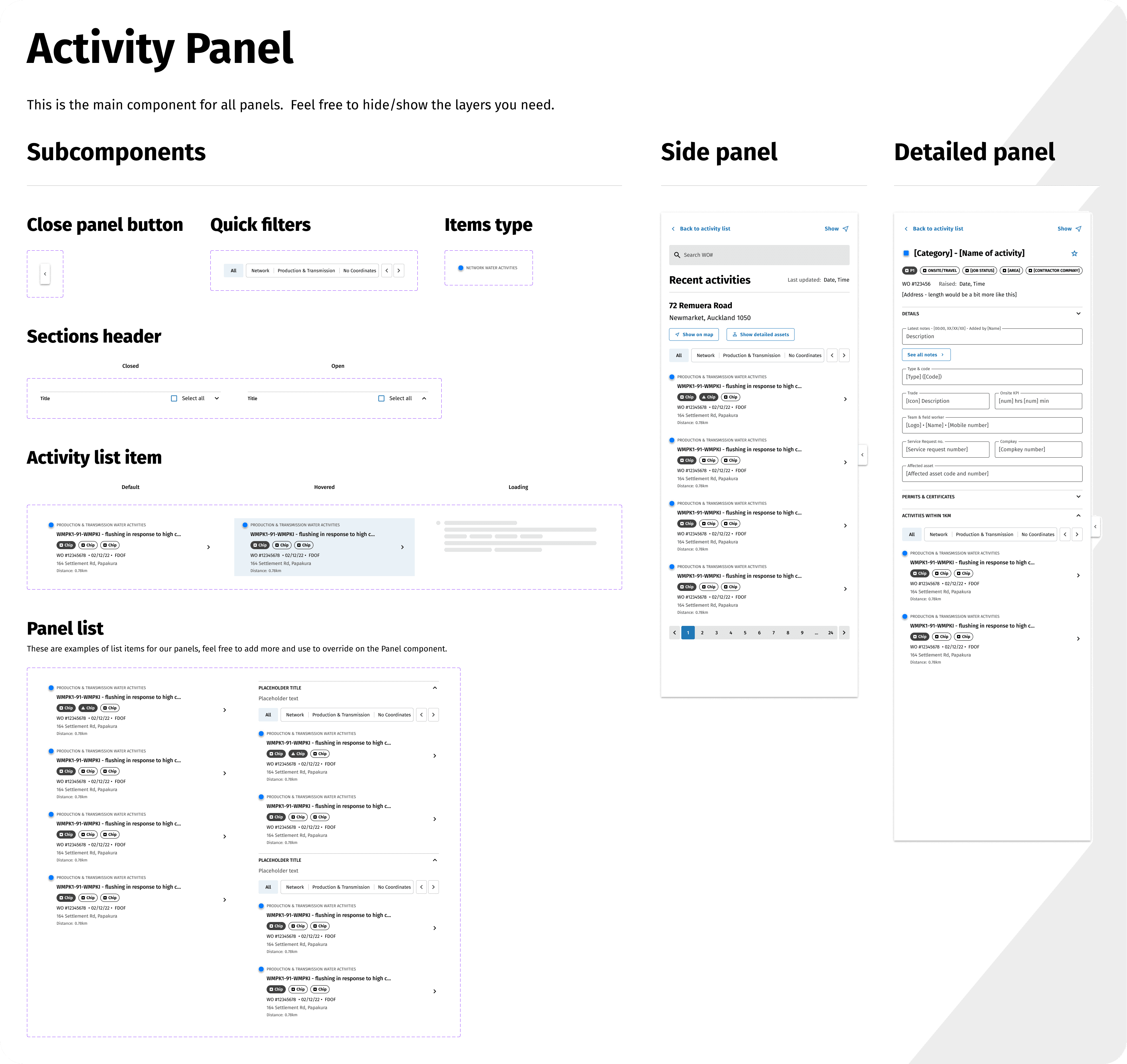
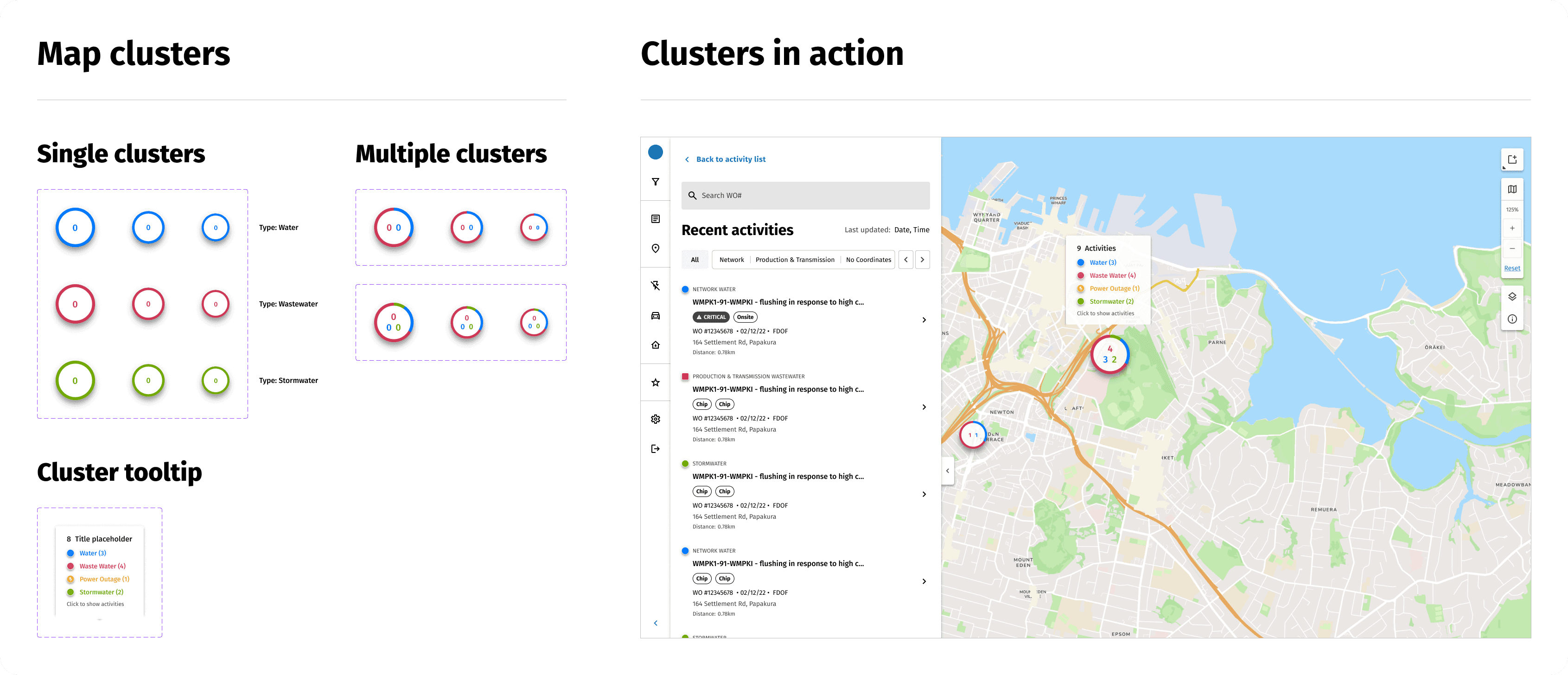
The changes

The changes

Stronger system foundation

Stronger system foundation

Consolidated components and applied Figma tokens for light/dark modes and adaptable branding.

Consolidated components and applied Figma tokens for light/dark modes and adaptable branding.

Consolidated components and applied Figma tokens for light/dark modes and adaptable branding.

Expanded and flexible features

Expanded and flexible features

Introduced region select, multiple asset levels, and stormwater activities to support broader organisational use.

Introduced region select, multiple asset levels, and stormwater activities to support broader organisational use.

Introduced region select, multiple asset levels, and stormwater activities to support broader organisational use.

Scalable iconography

Scalable iconography

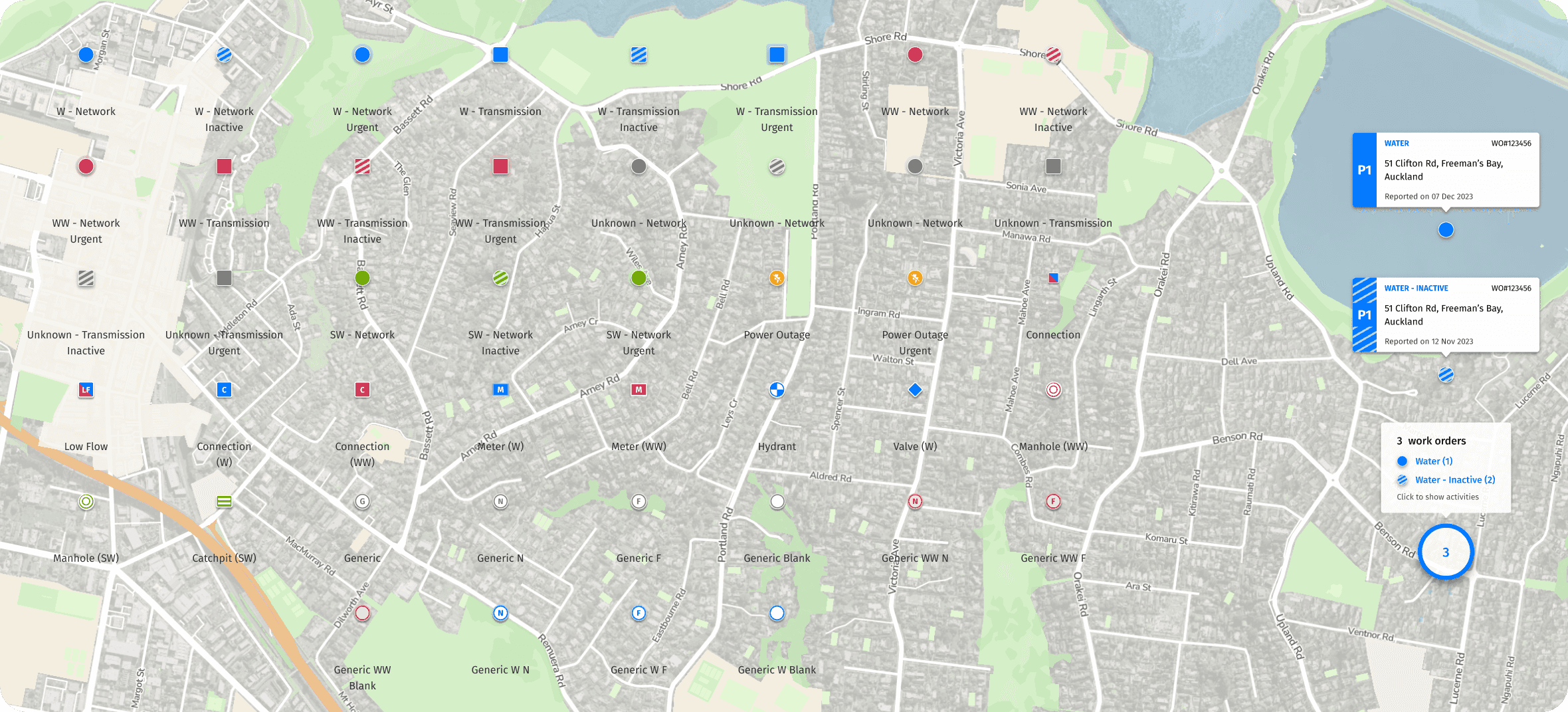
Developed a consistent system for diverse assets and interactions, ensuring it could easily extend to any future icons.

Developed a consistent system for diverse assets and interactions, ensuring it could easily extend to any future icons.

Developed a consistent system for diverse assets and interactions, ensuring it could easily extend to any future icons.

The retrospective

The outcome: Faster decisions, confidence in scale

Activity Tracker launched supporting three distinct user groups across Auckland's 5,000 km² network. Phase 2 extended that foundation to multiple regions, asset types, and workflows with consolidated components, design tokens, and a scalable iconography system built to absorb any future expansion without rework.

Detailed drill-downs, new filters, and map shortcuts give users precise control. Intuitive layouts make critical data legible in seconds including during high-pressure situations like flash floods and drought.

The takeaway: Know your users

Two years embedded with the Watercare team taught me more about their users than any formal testing session. Trust built through proximity — sitting with Controllers in their control rooms, watching staff use the tool live at the launch event enabled rapid feedback on design decisions and ensured the system aligned with real workflows — surfaced the invisible workflows and real constraints that shaped every design decision.

The impact: A long-lasting client partnership

We started with Activity Tracker, but the dedication, quality of work, and relationships built over two years led to something beyond a single project. Since launch, I've continued working with Watercare — co-facilitating a Journey Mapping workshop with their BA chapter and contributing to a UX knowledge base to support ongoing capability building across the Digital team.

Ghost Dynamics have been highly collaborative in all design phases and undertaken effective user research and testing on a number of our products to validate and collate feedback from our users.

These valuable insights have led to fit for purpose designs that have contributed to our ability to develop the best products with our users' needs at the forefront.

—Activity Tracker Product Owner, Watercare

The outcome: Faster decisions, confidence in scale

Activity Tracker launched supporting three distinct user groups across Auckland's 5,000 km² network. Phase 2 extended that foundation to multiple regions, asset types, and workflows with consolidated components, design tokens, and a scalable iconography system built to absorb any future expansion without rework.

Detailed drill-downs, new filters, and map shortcuts give users precise control. Intuitive layouts make critical data legible in seconds including during high-pressure situations like flash floods and drought.

The takeaway: Know your users

Two years embedded with the Watercare team taught me more about their users than any formal testing session. Trust built through proximity — sitting with Controllers in their control rooms, watching staff use the tool live at the launch event enabled rapid feedback on design decisions and ensured the system aligned with real workflows — surfaced the invisible workflows and real constraints that shaped every design decision.

The impact: A long-lasting client partnership

We started with Activity Tracker, but the dedication, quality of work, and relationships built over two years led to something beyond a single project. Since launch, I've continued working with Watercare — co-facilitating a Journey Mapping workshop with their BA chapter and contributing to a UX knowledge base to support ongoing capability building across the Digital team.
Ghost Dynamics have been highly collaborative in all design phases and undertaken effective user research and testing on a number of our products to validate and collate feedback from our users.

These valuable insights have led to fit for purpose designs that have contributed to our ability to develop the best products with our users' needs at the forefront.

—Activity Tracker Product Owner, Watercare

The outcome: Faster decisions, confidence in scale

Activity Tracker launched supporting three distinct user groups across Auckland's 5,000 km² network. Phase 2 extended that foundation to multiple regions, asset types, and workflows with consolidated components, design tokens, and a scalable iconography system built to absorb any future expansion without rework.

Detailed drill-downs, new filters, and map shortcuts give users precise control. Intuitive layouts make critical data legible in seconds including during high-pressure situations like flash floods and drought.

The takeaway: Know your users

Two years embedded with the Watercare team taught me more about their users than any formal testing session. Trust built through proximity — sitting with Controllers in their control rooms, watching staff use the tool live at the launch event enabled rapid feedback on design decisions and ensured the system aligned with real workflows — surfaced the invisible workflows and real constraints that shaped every design decision.

The impact: A long-lasting client partnership

We started with Activity Tracker, but the dedication, quality of work, and relationships built over two years led to something beyond a single project. Since launch, I've continued working with Watercare — co-facilitating a Journey Mapping workshop with their BA chapter and contributing to a UX knowledge base to support ongoing capability building across the Digital team.
Ghost Dynamics have been highly collaborative in all design phases and undertaken effective user research and testing on a number of our products to validate and collate feedback from our users.

These valuable insights have led to fit for purpose designs that have contributed to our ability to develop the best products with our users' needs at the forefront.

—Activity Tracker Product Owner, Watercare